
The five-minute review ritual
The fourth beat of what using Playto is like. By now the right things are getting saved. This is about the small thing you do afterwards so that they turn into something you actually remember. (For the general, tool-agnostic version of this routine — including what to do during play — see a study routine for gaming sessions.)
Five minutes, not thirty
Saved vocabulary that nobody revisits is a list with good intentions attached.
The reliable failure here isn’t skipping review. It’s planning a thorough one. A thirty-minute session you intend to do beats nothing, right up until the week you’re busy, and then it beats nothing in a different way. Five minutes survives travel, bad weeks and busy months, and something that survives is worth more than something that’s better on paper.
The minute that matters
When you stop a session, Playto shows you what came up while you still remember the scene it came from.
Tick what you want to keep, drop what turned out dull, and deal with any proper nouns it flagged. That’s the part worth doing, and it’s about a minute. It’ll offer to go further, filling in definitions, saving whole sentences and phrases, running a quick pass over the words you kept. Take that when you feel like it and skip it when you don’t. Nothing is lost by stopping after the ticking.
One thing to know: this belongs to a proper learning session. If you used Quick Translate to read something in passing, there’s no closing step, by design.
A few cards, the next morning
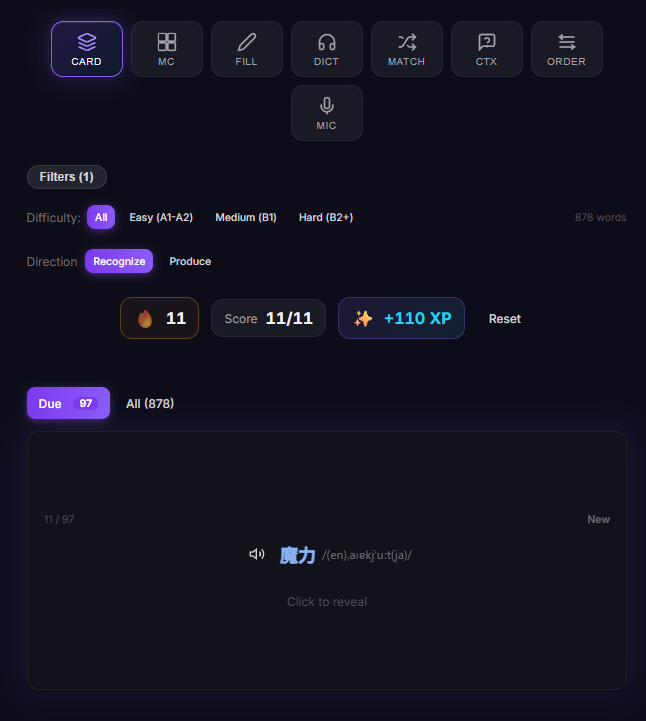
The scheduling underneath is ordinary spaced repetition. Words you keep missing come back soon, words you know stay out of your way, and yesterday’s saves surface first.
There are eight review formats. You are not expected to use eight. Pick the one that suits how you learn and let the rest sit there. On mornings when even choosing feels like work, the home screen just hands you what’s due, one item at a time.
When to skip it entirely
Fifteen minutes of play and two saved words don’t need a ceremony. Stop and go to bed.
The ritual earns its place when the session was long enough to produce real curation work. For a quick play, just stop.
The last beat is what it’s like when the translation is wrong.
Playto has a free version on Steam if you’d like to see what a week of this looks like.